
License FAQ
This page answers the most common questions about how the PageTatin license works. If you can’t find your answer here, write to support[at]pagetatin.com and I’ll get back to you within one business day.
I bought PageTatin – where’s my license code?
Section titled “I bought PageTatin – where’s my license code?”Right after purchase you should have received two emails:
- A receipt from Paddle (my payment processor)
- A license delivery email from support[at]pagetatin.com, with your code in a clearly-labeled block
If you don’t see the second one within a few minutes of buying, check your spam folder. If it’s not there, write to support[at]pagetatin.com with your Paddle order number and I’ll resend it.
How many devices can I install PageTatin on?
Section titled “How many devices can I install PageTatin on?”It depends on your license tier:
- Freelancer ($59): 2 devices. Both can be active and in use at the same time. There’s no cloud sync between them.
- Small Team ($99): up to 5 named people, each able to activate on 2 devices. 10 active device slots total across the team.
You can keep PageTatin installed on as many machines as you like, but only the licensed number can have an active license at any given time.
Can I use PageTatin on both Mac and Windows?
Section titled “Can I use PageTatin on both Mac and Windows?”Yes. Your license isn’t tied to a platform. A Freelancer license could activate one Mac and one Windows machine, or two Macs, or two Windows machines. Whatever combination works for you.
What if I get a new computer?
Section titled “What if I get a new computer?”Deactivate PageTatin on the old computer first (Settings → License → Deactivate this device), then activate on the new one with the same license code.
If the old computer is broken or you sold it without deactivating, write to support[at]pagetatin.com with your license code and I’ll release the slot manually. Naming your devices in the License tab makes it easy to tell me which slot to release.
What if I lose my license code?
Section titled “What if I lose my license code?”Search your inbox for emails from support[at]pagetatin.com – the original license email contains the code. If you’ve deleted it, write to support[at]pagetatin.com with the email address you used at purchase and I’ll resend it.
What does “free updates for 12 months” mean?
Section titled “What does “free updates for 12 months” mean?”Every feature update, bug fix, and improvement I release in the 12 months after your purchase date is included at no extra charge. After 12 months, PageTatin continues working exactly as you bought it. You don’t lose features, the app doesn’t expire, nothing changes – you just stop getting new updates.
If I release a major new version (PageTatin 2.0, hypothetically) after your 12-month window, you can buy an upgrade license at a discount. Or stay on your current version forever – it’s yours.
Do I need internet to use PageTatin?
Section titled “Do I need internet to use PageTatin?”Only for two things:
- First activation – PageTatin contacts the license server once to verify the code you entered. Takes 1–3 seconds. After that, it stores a license file locally. All your flatplan data stays on your hard drive.
- Approximately once every 30 days – when you launch PageTatin while connected, it does a silent background check with the license server to catch revoked licenses (refunds, chargebacks, suspended-due-to-abuse). This is under 1 second, completely invisible to you. If PageTatin can’t reach the server at launch, it simply tries again next time.
Everything else – creating flatplans, importing thumbnails, exporting .pdfs, exporting .json – runs entirely on your machine. Your flatplan data never leaves your computer.
Can I get a refund?
Section titled “Can I get a refund?”Yes. I offer a 30-day money-back guarantee. If PageTatin doesn’t work as described on your supported platform (macOS or Windows) within 30 days of purchase, write to support[at]pagetatin.com with your order number and I’ll refund you in full within 5 business days.
See the full refund policy for the details.
What happens if my license stops working?
Section titled “What happens if my license stops working?”If PageTatin shows an “activation required” screen at app launch after it had been working fine, the license has been suspended on the server side. This usually means one of three things:
- A refund was processed
- A chargeback was filed against the purchase
- The license showed clear abuse patterns (one code activating on many machines across distant geographies)
Your flatplans are still on your computer – they’re not deleted, not encrypted, not held hostage. PageTatin just refuses to open them until the license is resolved.
If you think your license was suspended in error, write to support[at]pagetatin.com with your license code and I’ll investigate within one business day.
How do I deactivate a device?
Section titled “How do I deactivate a device?”Inside PageTatin, on the device you want to deactivate:
- Open Settings (⌘, on macOS, or Edit → Settings on Windows)
- Click the License tab
- Click Deactivate this device
- Confirm
PageTatin releases the device slot on the license server, deletes the local license file, and returns to the Activation Screen. You can now use the same license code to activate on a different device.
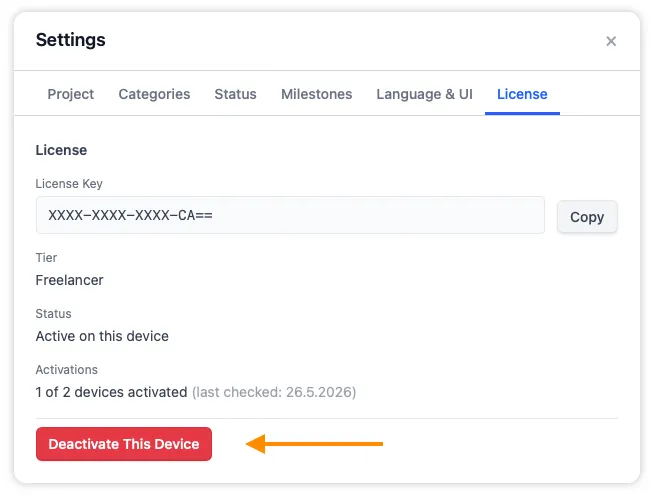
Deactivation connects briefly to the license server. If the device is broken or otherwise unreachable, write to support[at]pagetatin.com.
I need to add more team seats – how?
Section titled “I need to add more team seats – how?”The Small Team license covers up to 5 people. If you need more, write to support[at]pagetatin.com and I’ll set up a custom license for your team size.
I work freelance with multiple publishers – do I need multiple licenses?
Section titled “I work freelance with multiple publishers – do I need multiple licenses?”No. One Freelancer license covers all your work, however many publishers you take on. The 2-device limit is about which computers are activated, not who you work for. If you flatplan magazines for three different publishers on the same laptop, that’s one device slot.
Can I resell my license?
Section titled “Can I resell my license?”No. Licenses are non-transferable. Each license is bound to the email address used at purchase.
If circumstances change (you stop doing magazine work, for example), you can let the license sit unused; it doesn’t expire. You can also reach out to support[at]pagetatin.com if you have an unusual situation.
What about VAT / sales tax?
Section titled “What about VAT / sales tax?”Pricing on the PageTatin website is shown net (before tax). Local taxes are calculated and collected by Paddle at checkout, based on your location:
- In the US: no VAT.
- EU businesses with a valid VAT ID: 0% under the Reverse Charge mechanism (enter your VAT ID at checkout).
- EU consumers: your local VAT rate, collected and remitted by Paddle on my behalf.
- Other regions: local sales tax where applicable, handled automatically by Paddle.
You don’t need to do anything special – the correct tax appears at checkout based on the country and tax status you enter.
Where can I see my purchase history?
Section titled “Where can I see my purchase history?”Paddle handles all payment records. You can manage your purchase, download receipts, and update payment details at https://my.paddle.com using the email address you used at purchase.